01 / PREPARE
Bring the lead into context.
Keep company, market, intent, campaign and existing thread history together before drafting.
Lead and campaign details →An AI-assisted workspace for Gmail-connected campaigns, company knowledge, follow-up and sales visibility — with people in control of every send.
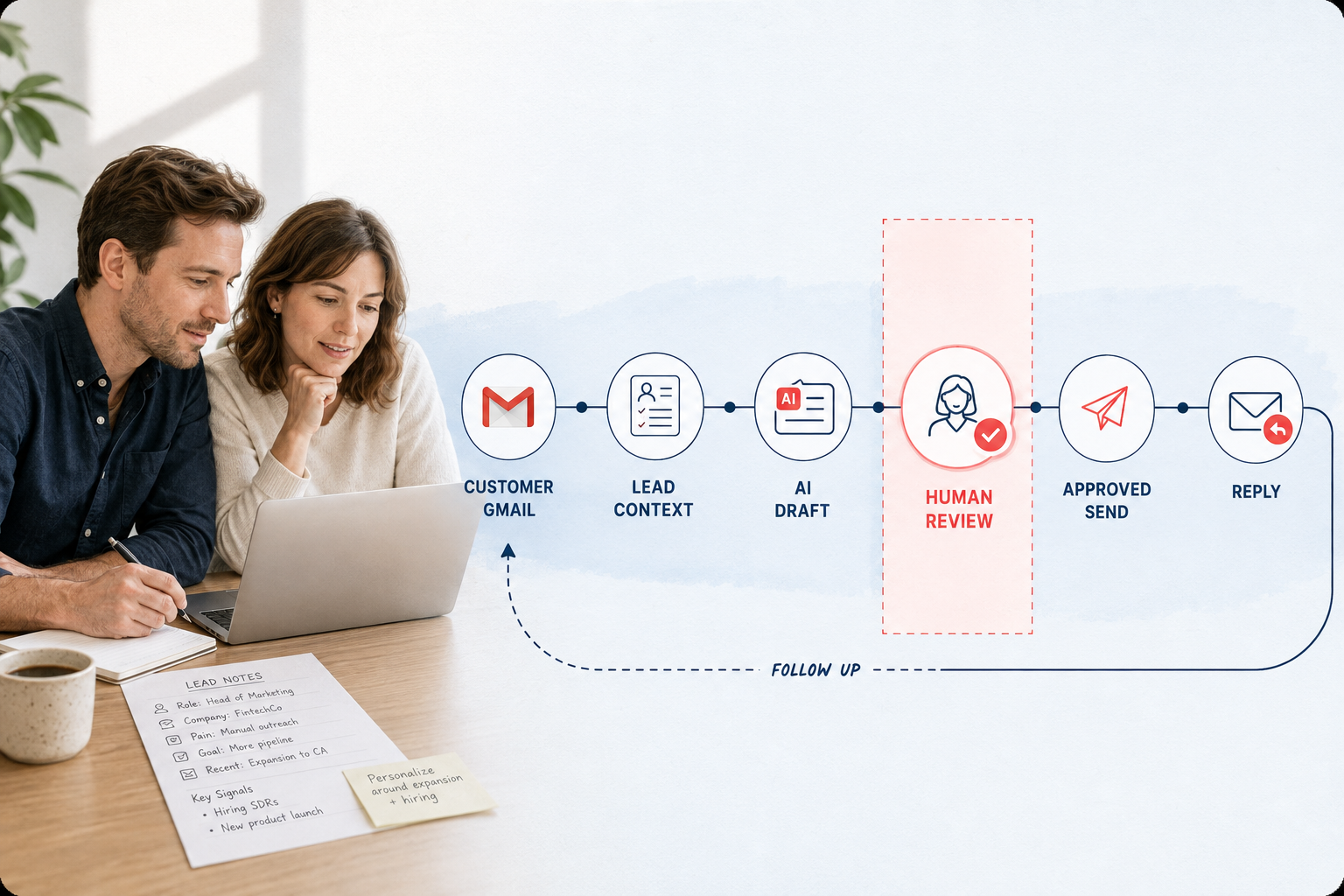
One visual connects Gmail, lead context, drafting, human review and the reply that follows.
The workspace joins the information sales teams need before a message leaves the mailbox with the decisions they need after a reply arrives.

Keep company, market, intent, campaign and existing thread history together before drafting.
Lead and campaign details →Use facts, offers and playbooks to guide language, tone, goal and the next useful question.
Knowledge boundary →Show citations, confidence, risk, suppression and reply state before a reviewer approves an action.
Review rules →Track replies, bounces, ownership, follow-up and opportunity movement without losing the original context.
Monitoring →We compete on a safer operating loop: customer-owned Gmail, clear contact capacity, a send allowance and human approval before the message leaves the mailbox.
For a focused operator working from a customer-owned Gmail mailbox with suppression and a visible approval step.
For teams that need a larger contact pool, shared knowledge and a clearer path from reply to next action.
For agencies and sales teams that need broader reach, role controls and a dependable review path.
Competitive position: unlike a generic mailbox pool, StarDrive keeps Gmail ownership, suppression, review and follow-up visible. Send allowances remain subject to Gmail per-mailbox limits, account type, domain authentication and workspace policy; provider, warm-up and verification charges remain separate.
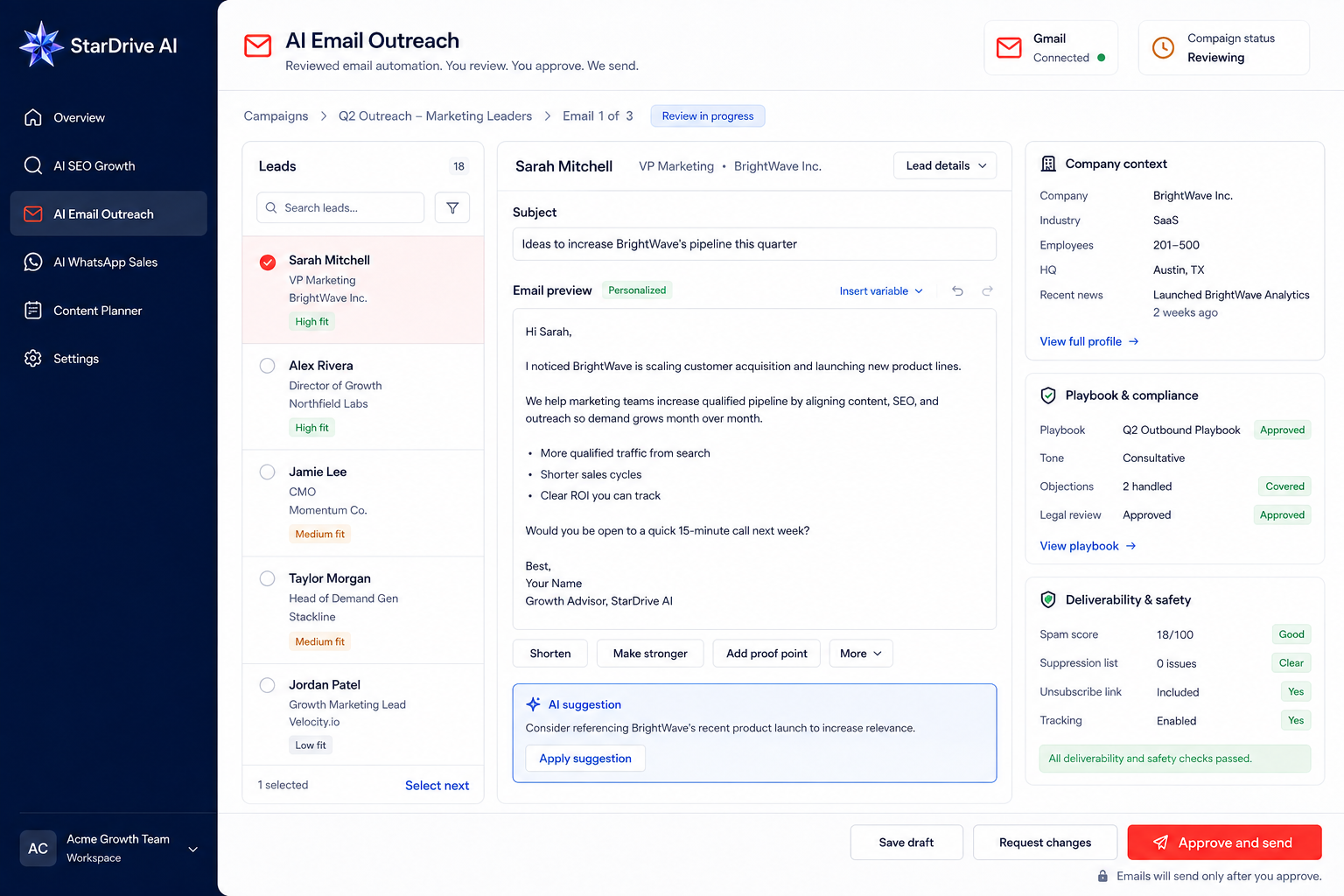
AI Email Outreach keeps the candidate, the campaign goal and the existing thread visible before it prepares a review batch. That makes it possible to skip the wrong recipient before a draft is created.
Talk through your outreach path →Contact name, company, region, source, intent and current status give the draft a real reason to exist.
Know who you are addressingDefine the goal, target market, language, offer and playbook instead of hiding them inside a single prompt.
Know what the message should doExisting inbound threads, terminal states and prior drafts are checked before a new outbound draft is prepared.
Do not interrupt a live conversationA batch reports processed, skipped and failed items, then places safe drafts in the inbox review queue.
Review the work in one placeProducts, specifications, delivery rules, policies, FAQs and approved company information are maintained as source material.
Define what is being offered, why it matters and which call to action is appropriate for the campaign.
Set the goal, language, tone, structure, qualification questions and approval mode without mixing them with product facts.
Drafts can show which approved source supported a claim. Unsupported or sensitive details remain flagged for a human.
Reliable outreach needs more than a company description. The workspace separates the truth about the product from the goal and style of the campaign so each can be reviewed and updated independently.
The customer-facing product calls this an AI-assisted draft. Technical configuration stays behind the scenes so the workspace stays focused on the work.
Enter the Email workspace →The product makes the reviewer’s decision short, visible and reversible. It does not hide an automatic send behind a generic “continue” action.

Suppressed recipients, bounced addresses, cancelled leads and domains on the do-not-contact list are skipped before drafting.
If the recipient already has an inbound thread or a terminal state, a new outbound draft is not silently added.
Drafts carry language, citations, confidence, risk and a human-review decision before an external send action is possible.
Generation creates a local reviewable draft. Approval is a separate action with its own role and audit boundary.
The customer workflow starts in review mode. Real mailbox sending requires a separately enabled, explicitly controlled action.
Replies, bounce signals, ownership and opportunity movement remain linked to the Gmail thread rather than scattered across exports.
A user can enter a StarDrive AI account with email/password or Google. Mailbox sync and sending require a separate customer-owned Gmail authorization.

Use a normal email/password account or a permitted Google identity.
The account and role must be entitled to use AI Email Outreach.
The customer approves only the Gmail scopes this workflow needs.
Outreach is not finished when a draft is approved. The workspace keeps reply, bounce, suppression, owner, follow-up and opportunity signals close to the thread so the team can act on what happened.
Identify a useful response, pricing question, objection or request for a human owner.
Keep delivery, bounce and suppression signals visible without turning a problem into another send.
Make the assigned teammate, follow-up date and opportunity stage clear to the sales team.
Keep the actor, decision, version, source and result traceable across the workspace.
The public promise is straightforward: prepare better context, review the draft and know what happens next.
Google can be offered as an account identity option, but the account still needs the right product access. Gmail mailbox authorization is separate and only applies to the customer-owned mailbox that is connected.
The review workflow creates drafts for human review. An external send is a separate action controlled by workspace policy, role permissions and mailbox authorization.
The workspace uses the active company knowledge, offer and playbook context that the team has approved. Technical delivery settings stay behind the scenes.
Before a review draft is created, the workflow checks address validity, suppression, bounce/cancelled states, existing replies and duplicate campaign work.
Open the unified entry path or talk with us about the mailbox, team and approval flow your outreach needs.